










 Shop By Category

 Subscribe
 More Options
1080p webcams with tripod
Unfortunately, no deals have been found for 1080p webcams with tripod today

NOW
£ 24.99
£ 74.99
Smart Bird Feeder Camera - Wi-Fi Enabled 1080p HD Outdoor Kit with Live Streaming
6 bought

NOW
£ 22.49
£ 59.99
HD Dual-Camera Compact Point & Shoot - 50MP FHD 1080P Student Digital Camera
1 bought

NOW
£ 43.99
£ 145.99
4-in-1 Dash Cam 1080P Front, Rear, Left & Right - Full HD Car Camera System
2 bought

NOW
£ 16.99
£ 29.99
Mini Portable Camera, 1080P HD, 0.96” Display Screen, Wearable Pendant
2 bought

NOW
£ 32.99
£ 108.99
Wireless Smart Video Doorbell Camera with 1080P HD Night Vision & Two-Way Audio

NOW
£ 14.99
£ 42.99
Mini WiFi Hidden Spy Camera - 1080p HD Wireless Security Cam with Night Vision & Motion Detection
2 bought

NOW
£ 49.99
£ 129.99
Toucan Wireless Security Camera PRO with 1080p HD, Radar Motion & App - 2 Options
13 bought

NOW
£ 25.99
£ 39.99
Ring Indoor Camera (2nd Gen) - 1080p HD Plug-In Camera with Night Vision
20 bought

NOW
£ 21.99
£ 68.99
1080P Mini Body Camera Clip with 32GB Memory Card - Full HD Wearable Cam
3 bought

NOW
£ 99.00
£ 299.99
4 Channel 1080P AHD CCTV Kit with 5MP Cameras & 500GB HDD - Home & Business Security System
5 bought

NOW
£ 19.99
£ 39.99
1080p Front & Rear Full HD Smart Dash Camera
8 bought

NOW
£ 28.99
£ 123.99
48MP Compact Digital Camera Kit with Dual Lens, 1080P HD Video, 8x Zoom & 32GB Memory Card
2 bought

NOW
£ 39.99
£ 119.99
1080P Full HD Wireless Home Cinema Projector - Compact, Smart, Portable
7 bought

NOW
£ 23.99
£ 79.99
1080p Full HD Smart Dash Camera Set - Car Security Cam Kit with Wide-Angle Recording (2 or 3 Cam Variations, Optional 32GB SD Card)
19 bought

NOW
£ 23.99
£ 39.98
1080P Trail Wildlife Camera Kit - Full HD Motion Sensor, Wide Angle, Waterproof Options
8 bought

NOW
£ 55.99
£ 216.99
HD Astronomical Travel Telescope Kit with Tripod - Lightweight Portable Stargazing Essential
- Brand: Sensual Sale Co
- Gender: Unisex
- Location: National Deal
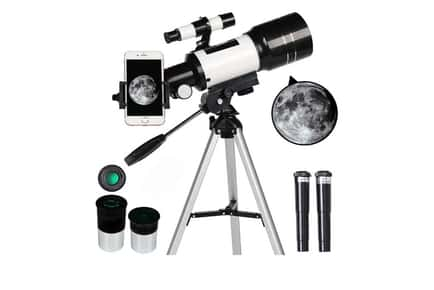
NOW
£ 56.99
£ 202.99
150X Magnification Astronomical Telescope with Tripod
- Age group: Adult
- Brand: Apple
- Gender: Unisex
262 bought

NOW
£ 61.99
£ 199.99
150X High-Performance Astronomical Telescope with Tripod
- Brand: Apple
- Gender: Unisex
- Location: National Deal
91 bought

NOW
£ 139.00
£ 270.00
ThinkPad X250 12-inch Laptop, SSD, Windows 10/11, Webcam
2 bought

NOW
£ 10.99
£ 29.99
3-in-1 LED Dual Light Selfie Stick Tripod - Adjustable Fill Light, Stainless Steel, Portable Beauty Gadget
5 bought

NOW
£ 10.99
£ 29.99
24oz Stainless Steel Insulated Water Bottle & Magnetic Tripod - Hydration for Active Lifestyles
2 bought
Discover Wowcher UK's best value on 1080p webcams with tripod, blending crisp full HD video with stable mounting for home offices, streaming desks, and professional calls. From compact 1080p webcams with built-in microphones to bundles that include a sturdy tripod and adjustable mounts, our listings cover USB webcams, plug-and-play setups, and compatibility with Windows, macOS, and popular conferencing apps.
Save on 1080p webcams with tripod stands and kit options that let you position the camera exactly where you need it. Look for features like auto focus, wide-angle field of view, dual microphone arrays, privacy shutters, and low-light enhancement. Whether you’re setting up for video calls, livestreams, or online teaching, Wowcher has deals on 1080p webcams with tripod to suit every budget.
Unbeatable Deals on 1080p webcams with tripod
Browse Wowcher UK for offers that include 1080p webcams with tripod mounts, bundled HD webcam with mic kits, and plug-and-play USB webcams ready for immediate use. Some listings feature free delivery, discounted express shipping, and bulk-buy promos on camera kits, tripod stands, and accessory bundles. Our partners frequently run promos on brand-name and budget-friendly webcams, helping you build a polished desktop setup without breaking the bank.
No matter if you’re video conferencing, streaming, recording tutorials, or capturing game footage, you’ll see clear product specs at checkout so you can compare resolution, frame rate, autofocus, microphone quality, and mount compatibility quickly and pick the best value.
Frequently Asked Questions
What should I look for when buying a 1080p webcam with tripod?
Key features include a true 1080p resolution for crisp detail, a comfortable frame rate (most webcams target 30fps; higher end options offer 60fps for smoother motion), and reliable autofocus or fixed focus depending on use. A built‑in microphone can save space, though many users prefer an external mic for better audio. A sturdy tripod with a 1/4-inch thread is essential to position the camera at the right angle, and look for a model with a secure mounting plate and adjustable height. Check for low-light performance, privacy shutter, compatibility with Windows, macOS, and major apps like Zoom, Teams, Skype, and OBS.
If you’re buying as a bundle, confirm whether a tripod is included and whether the kit has a USB-C or USB-A cable, or a dual cable setup. Also consider the field of view (FOV) to decide how wide your scene will be and whether you need a compact desktop footprint or a taller tripod for overhead shots.
Are tripods included with 1080p webcams or are they separate purchases?
Some Wowcher listings bundle a lightweight or adjustable tripod with the webcam, making it easy to set up on a desk or shelf. Others offer the webcam alone, so you can reuse an existing tripod or monitor mount. Check the product details for the included accessories, compatible screw size (most standard tripods use a 1/4‑inch thread), and the maximum height. If a tripod isn’t included, you can add a compact desktop stand or a flexible arm to your order.
Always verify the total price with delivery at checkout since bundles may carry different shipping terms or free delivery thresholds. A well‑matched webcam and tripod combo can improve your video framing and reduce shake during streaming or meetings.
What’s the difference between 1080p and 4K webcams, and is 1080p enough for video calls?
1080p provides crisp detail suitable for most video calls, webcasts, and streaming. 4K offers more detail but requires more bandwidth and a compatible display; many users don’t notice a real-time need for 4K in everyday calls. If you’re on a budget, a high‑quality 1080p webcam with good low‑light performance and solid autofocus often delivers the best balance of price and image quality. Look for 1080p at 30fps as standard, and consider 60fps models if you do fast-paced streaming or gaming.
Also evaluate how the camera handles exposure, color balance, and white balance. Many webcams include software to adjust these settings for Zoom, Teams, or OBS streaming. Remember that a tripod helps you position the camera precisely for flattering angles, whether you’re sitting at a desk or standing for demonstrations.
Can I use a 1080p webcam with tripod on multiple devices and operating systems?
Most modern webcams are USB plug‑and‑play and work across Windows PCs, macOS Macs, and many Linux setups. Look for a webcam that supports UVC (USB Video Class) to ensure broad compatibility without extra drivers. If you plan to use it with conferencing software like Zoom, Teams, Skype, Google Meet, or OBS, check whether the manufacturer provides software for color correction or privacy settings. A stable tripod attachment helps you keep a steady shot across devices and apps.
Additionally, confirm whether the cabling supports USB‑C or USB‑A and if the package includes adapters. Some Wowcher deals offer USB-C cables for newer laptops as part of the bundle, which can be convenient for MacBooks and many Windows laptops alike.
Do webcams with tripods include privacy features and mic quality suitable for calls?
Yes. Many 1080p webcam listings include privacy shutters or covers to protect your privacy when not in use. Built-in microphones vary; some offer stereo pickup and noise reduction, while others are clearly designed to pair with an external mic for better audio. If you’re frequently in meetings, check the mic type, pickup range, and compatibility with your conferencing app. A tripod helps you frame the shot to capture clear audio and reduce vibration during typing or foot movements.
Consider a separate USB microphone or a webcam with a dual mic setup if you require better voice clarity. At Wowcher UK, you’ll find bundles that combine a 1080p webcam, tripod, and microphone accessories to streamline your setup while keeping costs low.
What are common mounting options and how do I choose the best tripod for a webcam?
Tripods for webcams typically use a standard 1/4‑inch screw thread, the same as many small photography mounts. Look for adjustable height and tilt head, a stable base, and portability. If desk space is tight, choose a compact desktop tripod or a flexible gooseneck mount that clamps onto a monitor. For overhead shots or unique angles, a taller tripod or articulating arm can give you more versatility. When shopping on Wowcher UK, check whether the product description mentions the maximum load, plate compatibility, and whether a quick‑release plate is included.
Also consider cable length and travel weight if you’re using the webcam for remote work or travel. Bundles on Wowcher may include a lightweight, portable tripod with a carrying case, making it easy to take your 1080p webcam on the go.
How do I set up and get the best picture from my 1080p webcam with tripod?
Unbox and connect the webcam via USB, install any required drivers if needed, and launch your preferred video app. Place the webcam on the tripod at eye level for natural framing, then adjust the tilt and pan to frame your face and shoulders. Use the tripod’s height and angle to avoid reflections off a monitor and to minimise shadows. In most apps, set the resolution to 1080p and enable the microphone or a connected external mic for better audio. Try a few lighting setups—natural light from a window or a soft LED light in front of you—to improve contrast and skin tones.
If you’re streaming or recording, you may want to enable autofocus and exposure presets, and use a background without clutter. A simple, flattering lighting setup can dramatically improve the perceived quality of your 1080p webcam with tripod, especially when used with wide‑angle modes or at different desk heights.